Open source

An open-source Salesforce IDE that runs in your browser.

Apex classes, LWC components, SOQL queries, debug logs — all from a Chrome extension. No server, no CLI, no setup.

SF-INTEL STUDIO v3.6.0

demo-org.salesforce.com
Developer Utilities
SOQL Runner
Query objects and export
Anonymous Apex
Execute code scratchpad
Debug Logs
View execution logs
Schema Explorer
Browse org objects
SOQL Runner
⚡ Connected demo-org
Apex UTF-8
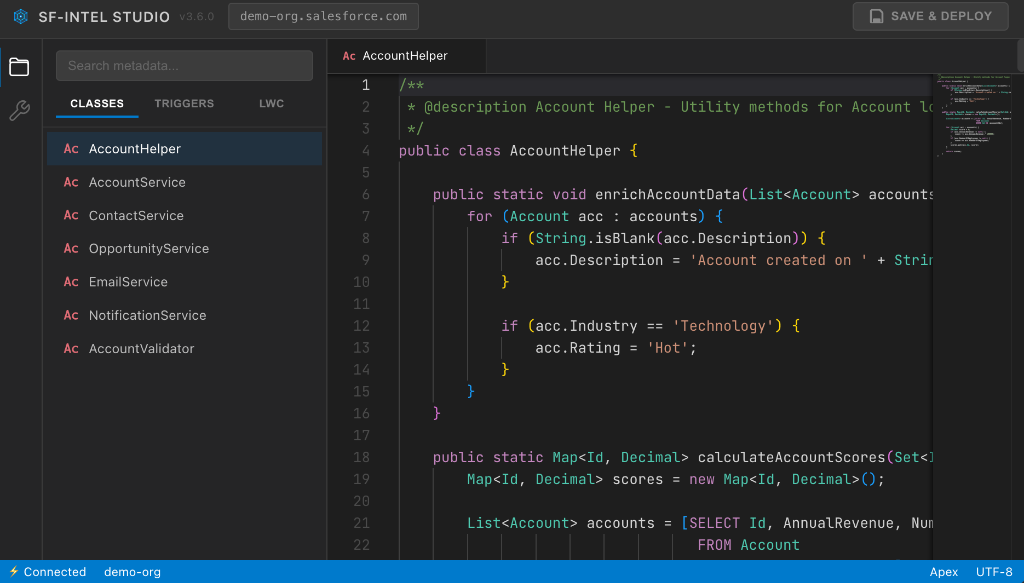
SF-Intel Studio IDE
Design Principles

No backend

There is no server between you and Salesforce. Your browser talks directly to Salesforce APIs over HTTPS. Your data never touches a third party.

No credentials

The extension reuses your existing Salesforce session. It never asks for your password, never stores a token to disk, and never phones home.

No setup

Install the Chrome extension, navigate to any Salesforce org, click the icon. You're working in under ten seconds.

Open source

Every line of code is public on GitHub under the MIT license. Audit it, fork it, contribute to it. No black boxes, no hidden behaviour.

Capabilities
Code editing
Full Monaco editor for Apex classes, triggers, and Visualforce pages. Syntax highlighting, bracket matching, and intelligent suggestions powered by your org's metadata.
SOQL
Write and execute queries with field-level autocomplete. View results in a structured table, export to CSV or JSON, and save frequently-used queries.
Lightning components
Browse, edit, and deploy LWC and Aura bundles. Full file tree support for multi-file components with HTML, JavaScript, and CSS.
Deployment
Save changes back to your org with a single click. Type-specific strategies for Apex, LWC, and Aura ensure reliability.
Metadata browser
Explore your org's metadata through a file tree — classes, triggers, components, objects, layouts. Search and filter across all types.
What it does

Six things that used to require a CLI, now in a tab.

Every workflow below runs in your existing Salesforce session. Nothing leaves your browser.

debug log · 14:32:08
12USER_DEBUG [Account] processing 47 records
13SOQL_EXECUTE SELECT Id FROM Contact
14DML_BEGIN update Contact
15EXCEPTION_THROWN System.LimitException
16↳ Too many SOQL queries: 101
17CUMULATIVE_LIMIT 101 / 100
18CODE_UNIT_FINISHED 218ms
01 · Apex debug

Read debug logs without losing your place.

Stream live logs from your org with syntax highlighting, governor-limit warnings, and one-click jumps from stack traces back to the offending Apex line.

  1. 01Open Debug Logs from the sidebar.
  2. 02Trigger your code path — logs appear as they're written.
  3. 03Click any exception line to open the source at the cursor.
explorer · 1,284 items
ApexClasses218
AccountController.clsapex
OpportunityService.clsapex
testRollup()
closeWon()
LightningWebComponents94
accountSummarylwc
pipelineChartlwc
Triggers12
02 · Metadata explorer

Every class, trigger, and component in one tree.

Browse and search your entire org's metadata from a single sidebar. Filter by type, fuzzy-search across files, and open any item directly in the editor.

  1. 01Open the extension on any Salesforce page.
  2. 02Type to filter — results match across all metadata types.
  3. 03Click any node to load it in the Monaco editor.
test run · 4.8s
42
Passed
2
Failed
87%
Coverage
AccountControllerTest.testInsert42ms
AccountControllerTest.testUpdate38ms
OpportunityServiceTest.testRollup214ms
ContactTriggerTest.bulkInsert95ms
LeadConverterTest.convert61ms
03 · Test runner

Run Apex tests, see coverage, jump to failures.

Execute single tests or full classes from the file tree. Coverage and timings appear inline; failed assertions link straight back to the test method.

  1. 01Right-click any test class in the explorer.
  2. 02Choose Run Tests — results stream in as they finish.
  3. 03Click a failed row to open the assertion in context.
Opportunity_Close_Flow.flow
Start amount > 50K? Notify VP Sales Update Pipeline yes no
04 · Flow analysis

See what your Flows actually do.

Visualise decision branches, loops, and side-effects of any Flow XML. Trace which records get touched, which Apex gets invoked, where the bottlenecks are.

  1. 01Open a Flow from the metadata explorer.
  2. 02Switch to Visual mode in the editor toolbar.
  3. 03Hover any node for inputs, outputs, and source XML.
deploy · 4 components
Validate metadata 182ms
Compile Apex 404ms
Deploy to demo-org running…
Run specified tests queued
05 · Deploy

Save and ship without leaving the tab.

Hit save and the right deployment strategy runs for the metadata type — Tooling API for Apex, Metadata API for LWC and Aura. Validation and tests are one click away.

  1. 01Edit any class, trigger, or component.
  2. 02Press Save & Deploy in the header.
  3. 03Watch validation, compile, and deploy run inline.
accountSummary · live
Source
<template>
  <lightning-card title="Account">
    <p>{name}</p>
    <p>{revenue}</p>
  </lightning-card>
</template>
Preview
Account
Acme CorpActive
Revenue$2.4M
OwnerJ. Doe
06 · LWC live preview

See your component render as you type.

Edit HTML, JavaScript, or CSS for any LWC and the preview pane updates instantly. No deploy required to iterate on layout, styling, or wire-adapter logic.

  1. 01Open an LWC bundle from the explorer.
  2. 02Toggle Preview in the editor toolbar.
  3. 03Edit any file — preview re-renders on save.

Built for teams that care about security.

No server infrastructure. No data collection. No elevated privileges. Just a Chrome extension that respects your environment.