A Salesforce IDE that runs in your browser

Edit Apex, run SOQL, inspect metadata, and deploy to your org. No server, no CLI, no setup. Just open Chrome.

SF-INTEL STUDIO v3.6.0

demo-org.salesforce.com
Developer Utilities
SOQL Runner
Query objects and export
Anonymous Apex
Execute code scratchpad
Debug Logs
View execution logs
Schema Explorer
Browse org objects
SOQL Runner
⚡ Connected demo-org
Apex UTF-8
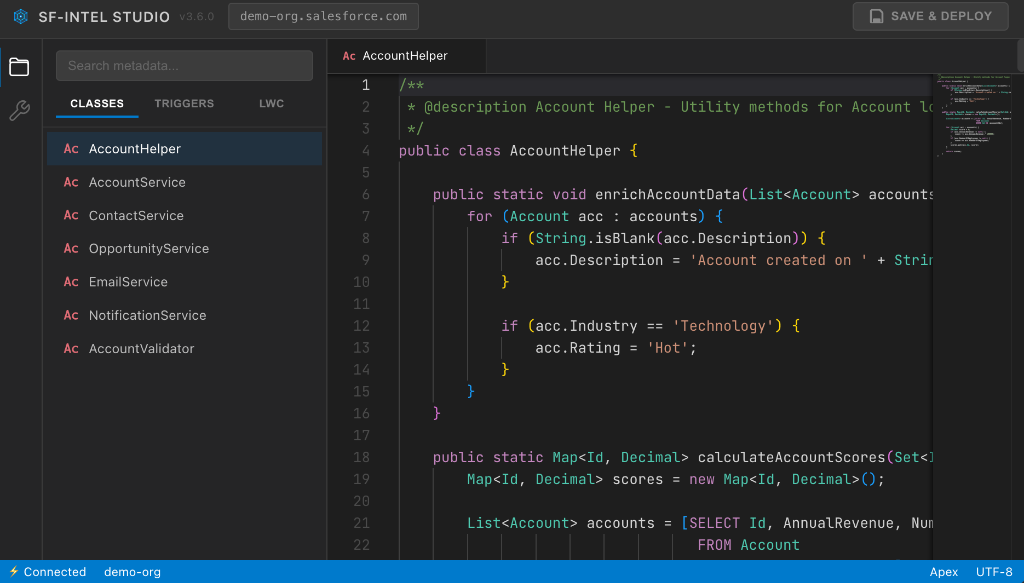
SF-Intel Studio IDE
Design Principles

No backend

There is no server between you and Salesforce. Your browser talks directly to Salesforce APIs over HTTPS. Your data never touches a third party.

No credentials

The extension reuses your existing Salesforce session. It never asks for your password, never stores a token to disk, and never phones home.

No setup

Install the Chrome extension, navigate to any Salesforce org, click the icon. You're working in under ten seconds.

Capabilities
Code editing
Full Monaco editor for Apex classes, triggers, and Visualforce pages. Syntax highlighting, bracket matching, and intelligent suggestions powered by your org's metadata.
SOQL
Write and execute queries with field-level autocomplete. View results in a structured table, export to CSV or JSON, and save frequently-used queries.
Lightning components
Browse, edit, and deploy LWC and Aura bundles. Full file tree support for multi-file components with HTML, JavaScript, and CSS.
Deployment
Save changes back to your org with a single click. Type-specific strategies for Apex, LWC, and Aura ensure reliability.
Metadata browser
Explore your org's metadata through a file tree — classes, triggers, components, objects, layouts. Search and filter across all types.

Built for teams that care about security.

No server infrastructure. No data collection. No elevated privileges. Just a Chrome extension that respects your environment.